
If you’re getting into automation — whether for your own business or as a freelance service — you’ll run into these three tools almost immediately. They all do the same core job: connect apps together so tasks happen automatically without you clicking through each step manually. But they’re built differently, priced differently, and suited to different kinds of users.
Here’s a practical breakdown based on actually using all three, not just reading feature lists.
The Quick Answer
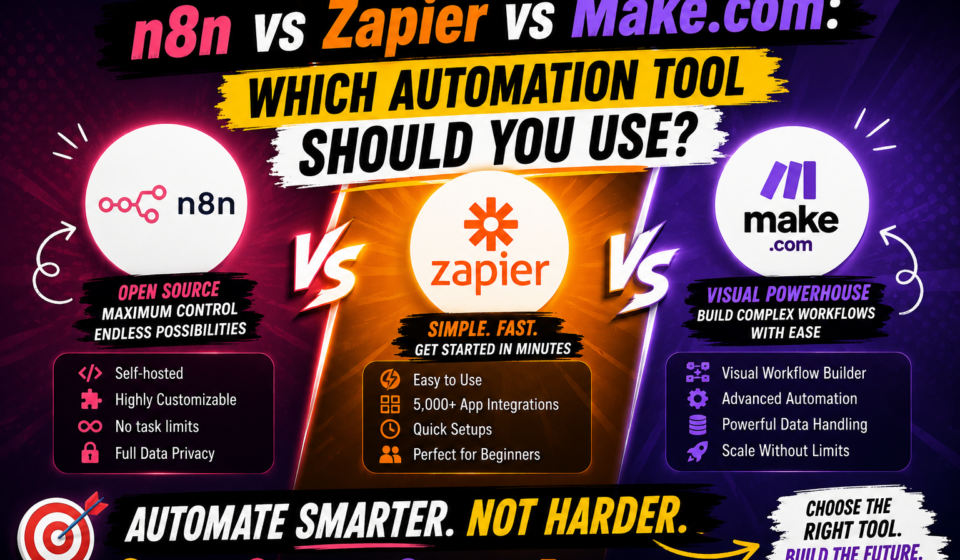
- Zapier — best for beginners and simple, fast automations. Easiest to learn, most expensive at scale.
- Make.com — best middle ground. Visual, flexible, more powerful than Zapier for the same price tier.
- n8n — best if you want full control, plan to handle complex logic, or want to self-host for free.
Now let’s go deeper.
Zapier: The Easiest On-Ramp
Zapier’s whole design philosophy is simplicity. You pick a trigger (something that starts the automation) and an action (what happens next), and you’re done. The interface reads almost like a sentence: “When this happens, do that.”
Strengths:
- Fastest to learn — most people can build their first automation in under 10 minutes
- Huge app library, so almost any tool you use probably connects
- Clean, reliable, well-documented
Weaknesses:
- Gets expensive fast once you need more “tasks” (each action counts as a task, and paid tiers price based on volume)
- Multi-step logic (branching, conditions) is more limited compared to Make or n8n
- Less visual — you don’t see the full automation “map” at a glance the way you do in Make or n8n
Best for: someone automating a handful of simple, linear workflows — e.g., “new form submission → add to spreadsheet → send email.”
Make.com: The Visual Middle Ground
Make (formerly Integromat) shows your entire automation as a flowchart-style canvas. You can see every branch, every condition, every step laid out visually, which makes debugging and building complex logic far more intuitive than Zapier’s linear list format.
Strengths:
- Visual builder makes complex, multi-branch automations easier to design and understand
- Generally more generous free tier and better pricing at mid-volume compared to Zapier
- Built-in tools for data transformation (splitting arrays, formatting dates, etc.) without needing extra steps
Weaknesses:
- Slightly steeper learning curve than Zapier — the visual canvas takes some getting used to
- Smaller app library than Zapier, though it covers all the major tools
Best for: people comfortable with a bit more complexity who want more automation power without jumping to a fully technical tool.
n8n: Full Control (and Free, If You Self-Host)
n8n is different from the other two in one major way: it’s open-source, and you can run it entirely for free on your own server or computer instead of paying a monthly subscription. There’s also a paid cloud version if you’d rather not manage hosting yourself.
Strengths:
- Free if self-hosted — no per-task pricing eating into your margins
- Handles complex logic extremely well: loops, conditions, custom code (JavaScript) inside workflows
- Full data visibility — you can inspect exactly what’s happening at every step, which is huge for debugging
- Great for people who want to eventually offer custom automation as a paid service, since it scales without ballooning costs
Weaknesses:
- Steepest learning curve of the three
- Self-hosting means you’re responsible for setup, updates, and occasionally troubleshooting server/network issues
- Smaller built-in app library — sometimes you’ll rely on generic HTTP/API connections instead of a pre-built integration
Best for: people serious about automation as a long-term skill or business, especially freelancers who want to keep operating costs near zero while building complex client workflows.
How to Actually Choose
Ask yourself these questions:
- Am I automating something simple and one-off, or complex and recurring?
Simple → Zapier. Complex → Make or n8n. - Do I care about long-term cost as volume grows?
If yes, n8n self-hosted removes the per-task pricing problem entirely. - Am I comfortable with a slightly technical setup process?
If you’re fine spending a weekend learning server basics, n8n pays off. If not, Zapier or Make will get you moving faster. - Is this for personal use or client work?
If you’re planning to freelance in automation, learning n8n specifically gives you a skill that’s harder to find and therefore more valuable — many businesses use Zapier themselves but hire freelancers specifically for the more technical n8n or Make builds.
My Honest Take
Start with Zapier to understand the concept of automation — trigger, action, test, activate. Once that clicks, move to Make.com to learn visual, multi-step logic. Then invest time in n8n if you want either zero ongoing costs or a genuinely marketable freelance skill. Each tool builds intuition for the next — they’re not really competitors so much as different rungs on the same ladder.